I took these notes myself during my trial at Automattic. I used them as a reference. Almost all of it is based on the official WordPress documentation.
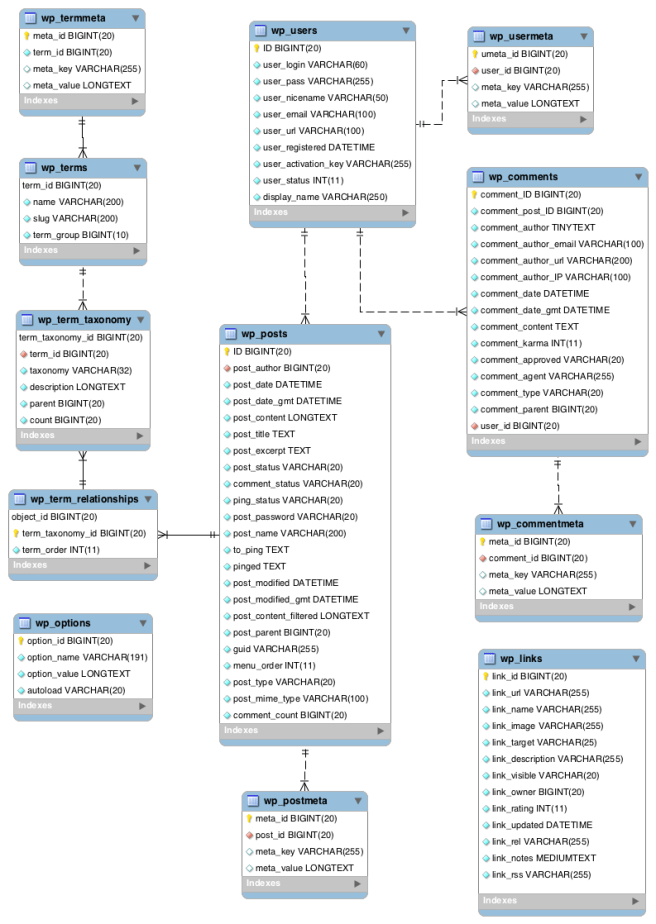
- Database Diagram
- Comments (
wp_comments) are a feature of blogs which allow readers to respond to Posts. Typically readers simply provide their own thoughts regarding the content of the post, but users may also provide links to other resources, generate discussion, or simply compliment the author for a well-written post. - Terms/categories (categories) for both posts and links and the tags for posts are found within the
wp_termstable. Posts are associated with categories and tags from thewp_termstable and this association is maintained in thewp_term_relationshipstable. - Extending
WP_List_Tableexample from Sensei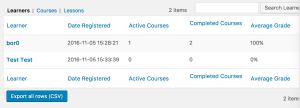
- Meta box (during post edit) example from Sensei

- Analysis = Submenu page (
add_submenu_page()), Sensei = Menu page (add_menu_page())

- Saving Plugin Data to the Database
- Post Meta (a.k.a. Custom Fields). Appropriate for data associated with individual posts, pages, or attachments. See
post_metaFunction Examples,add_post_meta(), and related functions. - Custom Taxonomy. For classifying posts or other objects like users and comments and/or for a user-editable name/value list of data consider using a Custom Taxonomy, especially when you want to access all posts/objects associated with a given taxonomy term. See Custom Taxonomies.
- Create a new, custom database table. This method is appropriate for data not associated with individual posts, pages, attachments, or comments — the type of data that will grow as time goes on, and that doesn’t have individual names. See Creating Tables with Plugins for information on how to do this.
- Post Meta (a.k.a. Custom Fields). Appropriate for data associated with individual posts, pages, or attachments. See
- Custom post types
- WordPress can hold and display many different types of content. A single item of such a content is generally called a post, although post is also a specific post type. Internally, all the post types are stored in the same place, in the
wp_postsdatabase table, but are differentiated by a column namedpost_type. - Custom post types are new post types you can create. A custom post type can be added to WordPress via the
register_post_type()function.
- WordPress can hold and display many different types of content. A single item of such a content is generally called a post, although post is also a specific post type. Internally, all the post types are stored in the same place, in the
- Hooks
- Actions are triggered by specific events that take place in WordPress, such as publishing a post, changing themes, or displaying an administration screen. An Action is a custom PHP function defined in your plugin (or theme) and hooked, i.e. set to respond, to some of these events. The event can be an internal one from WP (see https://codex.wordpress.org/Plugin_API/Action_Reference) or a custom one.
- Create a PHP function that should execute when a specific WordPress event occurs, in your plugin file.
- Hook this function to the event by using the
add_action()function. - Put your PHP function in a plugin file, and activate it (manually by calling
do_action()).
- Filters are functions that WordPress passes data through, at certain points in execution, just before taking some action with the data (such as adding it to the database or sending it to the browser). The filter can be an internal one from WP (see https://codex.wordpress.org/Plugin_API/Filter_Reference) or a custom one.
- Create the PHP function that filters the data.
- Hook to the filter in WordPress, by calling
add_filter(). - Put your PHP function in a plugin file, and activate it (manually by calling
apply_filters()).
- In some cases, you may find that you want your plugin to disable one of the actions or filters built into WordPress, or added by another plugin. You can do that by calling
remove_filter('filter_hook','filter_function')orremove_action('action_hook','action_function'). - Actions are similar to filters, where filters return a value and actions don’t.
- Actions are triggered by specific events that take place in WordPress, such as publishing a post, changing themes, or displaying an administration screen. An Action is a custom PHP function defined in your plugin (or theme) and hooked, i.e. set to respond, to some of these events. The event can be an internal one from WP (see https://codex.wordpress.org/Plugin_API/Action_Reference) or a custom one.
- Besides the hooks (actions and filters) described above, another way for a plugin to modify WordPress’s behavior is to override WordPress functions. In fact, there is a small set of functions WordPress intends for plugins to redefine. These are called Pluggable Functions and they are defined in wp-includes/pluggable.php. WordPress loads these functions only if they are still undefined after all plugins have been loaded. For more details examine wp-settings.php file.
- The Settings API (
wp_options), added in WordPress 2.7, allows admin pages containing settings forms to be managed semi-automatically. It lets you define settings pages, sections within those pages and fields within the sections.- Setting Register/Unregister:
register_setting(),unregister_setting() - Add Field/Section:
add_settings_field(),add_settings_section() - Options Form Rendering:
settings_fields(),do_settings_sections(),do_settings_fields() - Errors:
add_settings_error(),get_settings_errors(),settings_errors().
- Setting Register/Unregister:
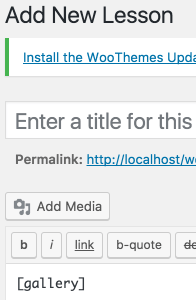
- The Shortcode API is a simple set of functions for creating WordPress shortcodes for use in posts and pages. For instance, the following shortcode (in the body of a post or page) would add a photo gallery of images attached to that post or page:
[gallery]- Minimal example:
add_shortcode( 'gallery', function() { return "Gallery" } );
- Minimal example:

 bor0's reflective blog