React redux tutorial

I just finshed the Redux tutorial from Egghead: https://egghead.io/courses/getting-started-with-redux.

It is a very good tutorial and it starts from building a React app using Redux, and then proceeds by refactoring it and showing some cool tips and tricks to make the code more readable and maintenable.

Here is an experimental project I built in the meantime: https://github.com/bor0/notes.

Here are the notes I took during the tutorial, with the hope someone finds them useful.

Decoupling for re-use:
Presentation component => only UI no behaviour = function, pass props as args
Container component => data and behaviour for presentational component = class, use this.props for props

this.forceUpdate() forces re render

Use function instead of class when possible

Change function to =>

Class Provider: React.Component.getChildContext => { store }
<Provider store=a> <App /> </Provider>
Retrieve context by const { store } = this.context in App.
App.contextTypes = Provider.contextTypes = { store: React.propTypes.object }

Use link components to help decoupling

1. Redux
2. React
3. Refactoring code to containers and components
4. React-redux for Provider and passing store using context
5. React-redux with connect and mapStateToProps to avoid Link classes

Separate presentation components and connect them with the store by using react-redux

No in-line dispatch of actions. Make the actions explicit by adding separate function for each.
Mega quick introduction to WordPress plugin development

I took these notes myself during my trial at Automattic. I used them as a reference. Almost all of it is based on the official WordPress documentation.

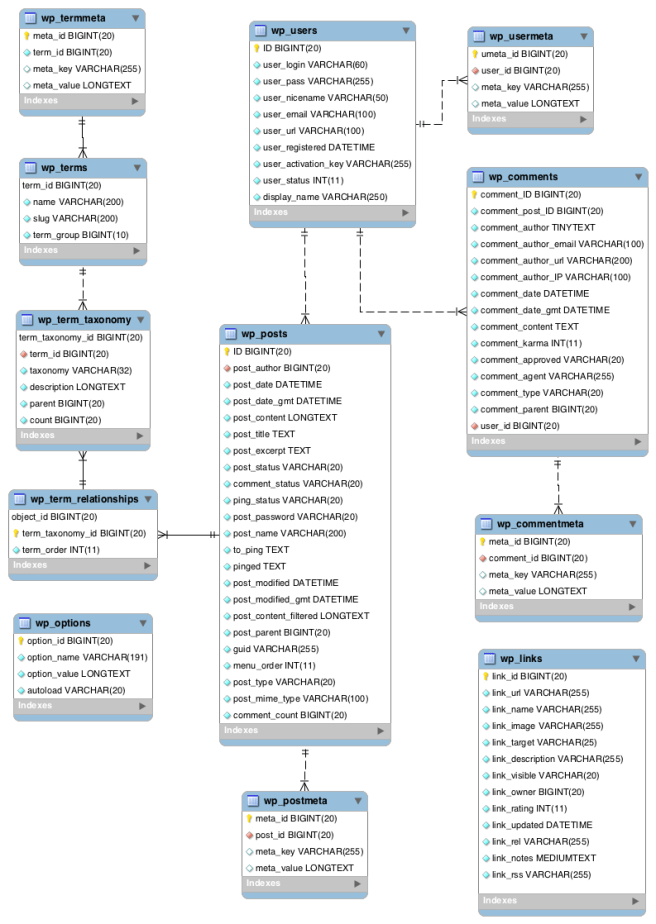
  • Database Diagram
  • Comments (wp_comments) are a feature of blogs which allow readers to respond to Posts. Typically readers simply provide their own thoughts regarding the content of the post, but users may also provide links to other resources, generate discussion, or simply compliment the author for a well-written post.
  • Terms/categories (categories) for both posts and links and the tags for posts are found within the wp_terms table. Posts are associated with categories and tags from the wp_terms table and this association is maintained in the wp_term_relationships table.
  • Extending WP_List_Table example from Sensei
  • Meta box (during post edit) example from Sensei
  • Analysis = Submenu page (add_submenu_page()), Sensei = Menu page (add_menu_page())

  • Saving Plugin Data to the Database
    • Post Meta (a.k.a. Custom Fields). Appropriate for data associated with individual posts, pages, or attachments. See post_meta Function Examples, add_post_meta(), and related functions.
    • Custom Taxonomy. For classifying posts or other objects like users and comments and/or for a user-editable name/value list of data consider using a Custom Taxonomy, especially when you want to access all posts/objects associated with a given taxonomy term. See Custom Taxonomies.
    • Create a new, custom database table. This method is appropriate for data not associated with individual posts, pages, attachments, or comments — the type of data that will grow as time goes on, and that doesn’t have individual names. See Creating Tables with Plugins for information on how to do this.
  • Custom post types
    • WordPress can hold and display many different types of content. A single item of such a content is generally called a post, although post is also a specific post type. Internally, all the post types are stored in the same place, in the wp_posts database table, but are differentiated by a column named post_type.
    • Custom post types are new post types you can create. A custom post type can be added to WordPress via the register_post_type() function.
  • Hooks
    • Actions are triggered by specific events that take place in WordPress, such as publishing a post, changing themes, or displaying an administration screen. An Action is a custom PHP function defined in your plugin (or theme) and hooked, i.e. set to respond, to some of these events. The event can be an internal one from WP (see https://codex.wordpress.org/Plugin_API/Action_Reference) or a custom one.
      • Create a PHP function that should execute when a specific WordPress event occurs, in your plugin file.
      • Hook this function to the event by using the add_action() function.
      • Put your PHP function in a plugin file, and activate it (manually by calling do_action()).
    • Filters are functions that WordPress passes data through, at certain points in execution, just before taking some action with the data (such as adding it to the database or sending it to the browser). The filter can be an internal one from WP (see https://codex.wordpress.org/Plugin_API/Filter_Reference) or a custom one.
      • Create the PHP function that filters the data.
      • Hook to the filter in WordPress, by calling add_filter().
      • Put your PHP function in a plugin file, and activate it (manually by calling apply_filters()).
    • In some cases, you may find that you want your plugin to disable one of the actions or filters built into WordPress, or added by another plugin. You can do that by calling remove_filter('filter_hook','filter_function') or remove_action('action_hook','action_function').
    • Actions are similar to filters, where filters return a value and actions don’t.
  • Besides the hooks (actions and filters) described above, another way for a plugin to modify WordPress’s behavior is to override WordPress functions. In fact, there is a small set of functions WordPress intends for plugins to redefine. These are called Pluggable Functions and they are defined in wp-includes/pluggable.php. WordPress loads these functions only if they are still undefined after all plugins have been loaded. For more details examine wp-settings.php file.
  • The Settings API (wp_options), added in WordPress 2.7, allows admin pages containing settings forms to be managed semi-automatically. It lets you define settings pages, sections within those pages and fields within the sections.
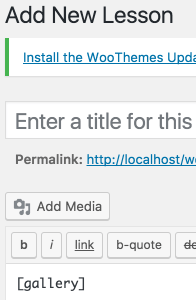
  • The Shortcode API is a simple set of functions for creating WordPress shortcodes for use in posts and pages. For instance, the following shortcode (in the body of a post or page) would add a photo gallery of images attached to that post or page: [gallery]
    • Minimal example: add_shortcode( 'gallery', function() { return "Gallery" } );

Reimbursement formula

Let’s assume that you work at an awesome company as a contractor.
They allow you to purchase equipment, and will reimburse the money you spent.

However, as a freelancer, you have to pay taxes. Let’s assume taxes are at 10% for any payment you receive on your account.

To further increase the greatness of the company, they say they will pay the taxes for you as long as you do the proper calculation.

So, as an example, let’s say you spend like $100 on computer equipment and ask for $100 reimbursement.
You will receive $100 on your bank account and have to pay 10% of that in taxes, so that’s $10, so you end up with $90.

You might also try to ask for $110 from the company, but 10% of that is $11 so you are left with $99. If you ask them to send you $11 for the taxes you paid, you will again have to pay 10% of $11 ($1.1) in taxes, and so on.

So the question is, how much money should the company reimburse you once, so that you get an amount close to the one you spent which includes taxes?

The answer is, if N is the money spent, you need to ask for reimbursement of N + \lceil \frac{N}{9} \rceil money.

As an example:

I spend: $100
They send: N + \lceil \frac{N}{9} \rceil, or $112
I pay tax: 10% * $112 = $11.2

Now, it holds that \$112 = Send \geq Spend + Tax = \$111.2

To derive that formula, we need to think in terms of recursion. Consider that multiple transactions are made, and for each transaction, you need to pay 10% in taxes of the transaction value.

Start with a number N:
1. Ask for pay of N money (company reimburses N)
2. Ask for pay of 10% of N (company reimburses 10% of N)
3. Ask for pay of 10% of 10% of N (company reimburses 10% of 10% of N)

And then, sum all the terms.

That makes something like: S = N + N/10 + N/100 + ... = N(1 + 1/10 + 1/100 + ...).

To calculate the 1 + 1/10 + 1/100 + ... part, we can let n = 1.1111.... So, 10n = 11.1111... and 10n - n = 9n = 10 and we get that n = 10/9. We rewrite that as 1 + 1/9 so that we can use ceil on the fractional part to get an integer.

P.S. I work at Automattic 🙂

Square of product of successive naturals

I’ve been working on an interesting task from a regional math contest:

Prove that the product of 8 successive naturals cannot be a natural number to the power of 4.

To prove this, we will first take a look at two other theorems (and prove them), and then use them to prove the original statement.

I. \sqrt{x} irrational \implies \sqrt{\sqrt{x}} irrational

To prove this, it suffices proving the contrapositive:
\sqrt{\sqrt{x}} rational \implies \sqrt{x} rational.

We have that for some a, b, a/b = \sqrt{\sqrt{x}}

Square both sides to get a^2/b^2 = \sqrt{x}. Thus, \sqrt{x} is rational.

II. \sqrt{x(x+1)} is irrational

To prove this, note that x and (x+1) need to be squares. Consider for some a, x = a^2. Further, for some b, x + 1 = b^2.

Now, b^2 - a^2 = (b - a)(b + a) = 1. But the only way this is possible if b - a = 1/(b + a).

Since a and b are positive naturals, we reach a contradiction for the identity above and thus either x or x+1 have no squares. In either case, \sqrt{x(x+1)} is irrational.

III. Prove that there is no y s.t. y^4 = x(x+1)(x+2)(x+3)(x+4)(x+5)(x+6)(x+7) = *

We will assume that such y exists and reach a contradiction.

Rewrite as y = \sqrt{\sqrt{*}} and suppose y is rational.

From I we have that it suffices to only prove that \sqrt{*} is rational.

From II we have that either x or (x+1) is irrational. At least one of the 8 elements has no square, and we reach a contradiction. Thus y is irrational.

Life keywords

A few keywords for life that everybody should be doing on a regular basis. 🙂

Life. Family. Love. Health. Work. Improve/Grow. Socialize. (Keep) Try(ing). Patience. Belief. Balance. Food. Rest. Relax. Think.

If you can do most of these, you should be happy and consider yourself lucky.